

Reflection & Acknowledgment
Teacher Acknowledgment
Acknowledgment lets a teacher confirm, on the record, that they have reviewed an observation. Acknowledging does not mean agreeing. For districts that need a dated teacher receipt on formal evaluations, the acknowledgment becomes part of the observation record.
What teachers see
Section titled “What teachers see”After the observer submits (and after the teacher’s reflection, when one is required), the state summary reads Acknowledgment requested. The form in the right-hand column is headed Acknowledge this observation, or Step 2 of 2: Acknowledgment after a reflection, with the line Confirm you’ve reviewed this observation. Does not imply agreement.
The teacher chooses one statement:
- I acknowledge this observation.
- I acknowledge, but disagree with part of this observation. Choosing this opens a box labeled Explain your disagreement (required).
Then the teacher clicks Acknowledge.
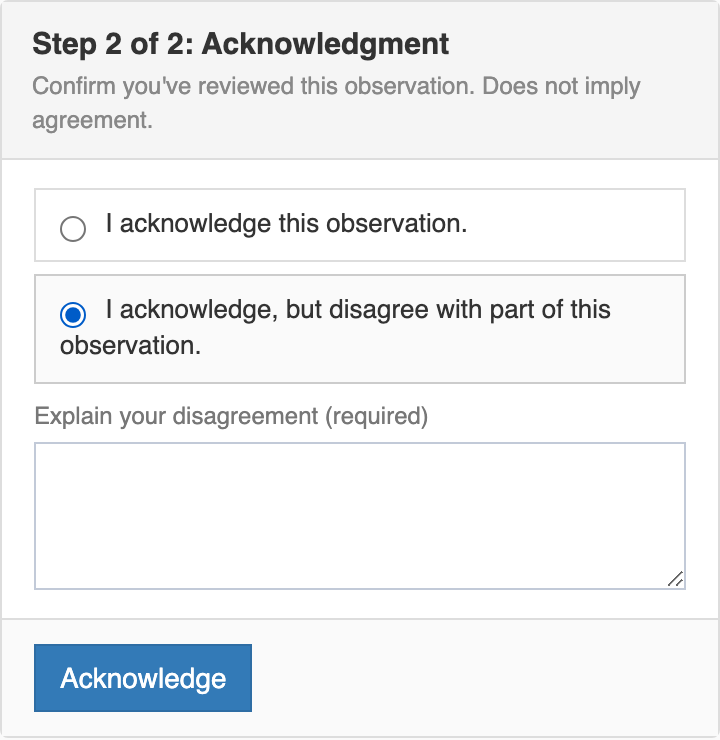
Teachers can acknowledge from inside the platform or from the secure email link, without logging in. An acknowledgment cannot be edited after it is submitted.
What is recorded
Section titled “What is recorded”The record keeps:
- The result: Acknowledged or Acknowledged with disagreement,
- The teacher’s name and the time, and
- The teacher’s explanation, when they disagree.
The acknowledgment appears in the observation’s Acknowledgment section and on the closed-observation PDF.
Turning it on
Section titled “Turning it on”Acknowledgment is set per Form Set, so it can be required on formal evaluations while informal walkthroughs stay as they are. Check Acknowledgment? in the Form Set’s edit window. The requirement is copied onto each observation when it is created, so it applies only to observations created after it is turned on.
Editing a Form Set takes the Publisher role or your account team. System administrators can see the setting as Acknowledgment: Yes or No on the Form Set page.
When the teacher does not respond
Section titled “When the teacher does not respond”An organization administrator or system administrator can close an observation that is still waiting on the teacher. The Close without acknowledgment link (or Close without reflection) appears in the Waiting on the teacher card on the right. An observer who is not also an administrator does not see it. The administrator must write a Close note, and the teacher sees that note on the observation.
The teacher can still acknowledge after the observation is closed this way. The observation stays closed.
When an observation is reopened
Section titled “When an observation is reopened”Reopening clears the teacher’s acknowledgment. If the observation required acknowledgment, the teacher is asked again after the observer resubmits.