

Other Settings
Swap Observations
What to do when an observation was recorded under the wrong teacher, observer, or school, and what Master Teacher support changes when it reassigns one.
An observation sometimes ends up under the wrong teacher, the wrong observer, or the wrong school. Master Teacher support can correct that with a tool called Swap Observations, which reassigns one of those three things on an existing observation without anyone redoing the visit.
District users do not see this page. No district role opens it, including system administrators and organization administrators. Only Master Teacher support and reseller staff can make a swap. This article explains when to ask for one, what to send, and what changes afterward.
When to ask for a swap
Section titled “When to ask for a swap”Mistakes like these happen in every busy observation season:
- An assistant principal picks the wrong “J. Miller” from the teacher list, and the walkthrough lands on a colleague’s record.
- An instructional coach records an observation while signed in on a principal’s tablet, so it lists the principal as the observer.
- A teacher who splits time between two buildings is observed at Birchwood Elementary, but the observation is saved under Cedar Hollow Middle School.
Each error puts evidence on the wrong teacher’s evaluation record and skews your reports. A swap moves the observation to the right person or school with its scores and feedback intact.
What to send Master Teacher support
Section titled “What to send Master Teacher support”Contact Master Teacher support with enough detail to find the one observation and make the one change:
- The observation: the date and time it was observed, the teacher it is under now, the observer, the school, and the form (for example, “Classroom Walkthrough on 10/08/2026 at 11:39 PM, Rosa Vance, observed by Marcus Reyes, Birchwood Elementary”).
- What is wrong: the teacher, the observer, or the school. A swap changes one of these at a time.
- The correct value: the right teacher, observer, or school, with the person’s email address if two staff members share a name.
Ask for each observation separately if several need fixing.
What support sees
Section titled “What support sees”Support works from a list of every observation in your district, with Status, Observed On, User Observed, Observed By, Organization, and Form. A notice at the top reads “Only reseller users can access this page. Please use this feature with caution.”
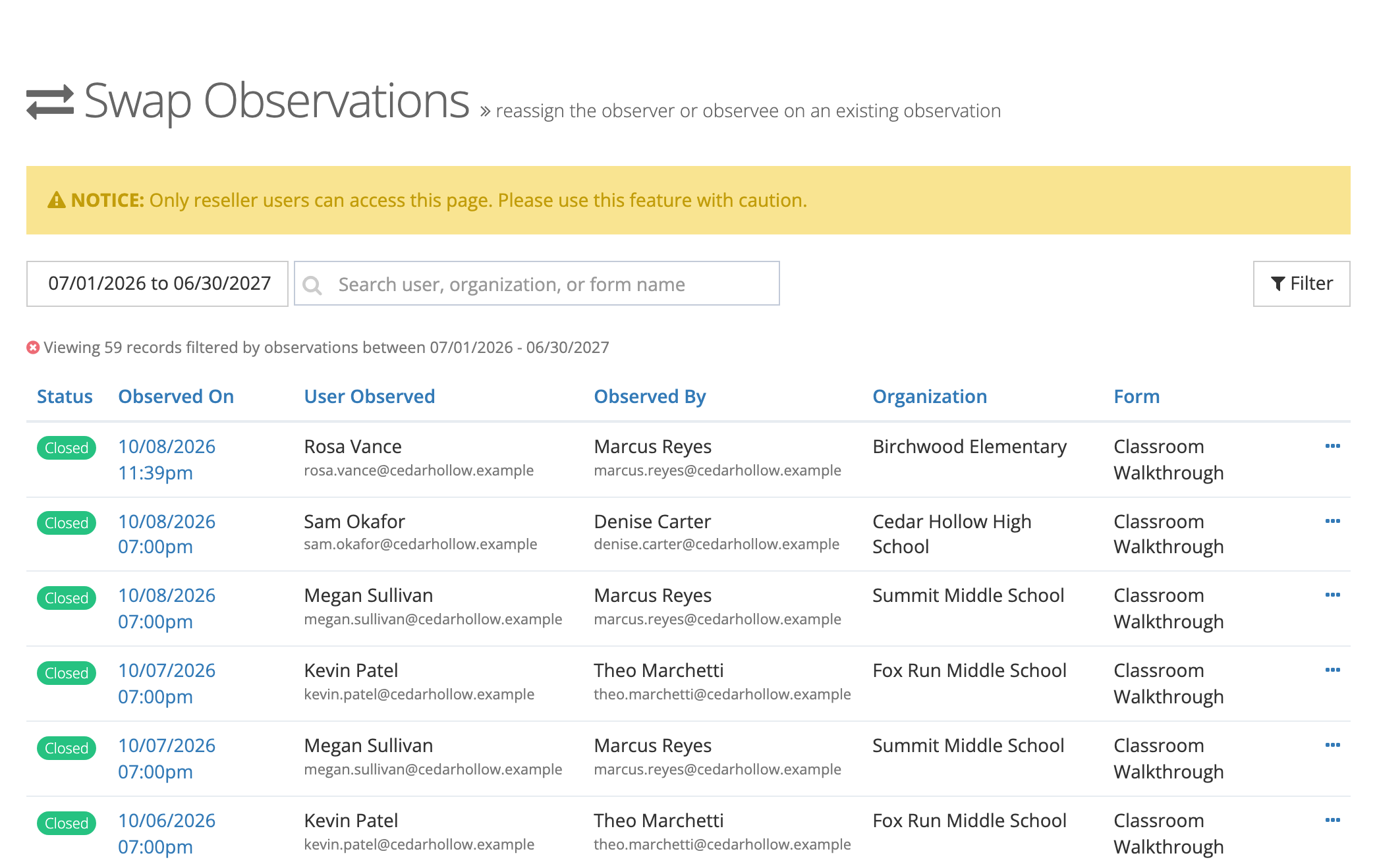
From an observation’s … menu, support chooses Swap Observee, Swap Observer, or Swap Organization. The window shows a summary of the observation and the current value, and support picks the correct one in Replace with.
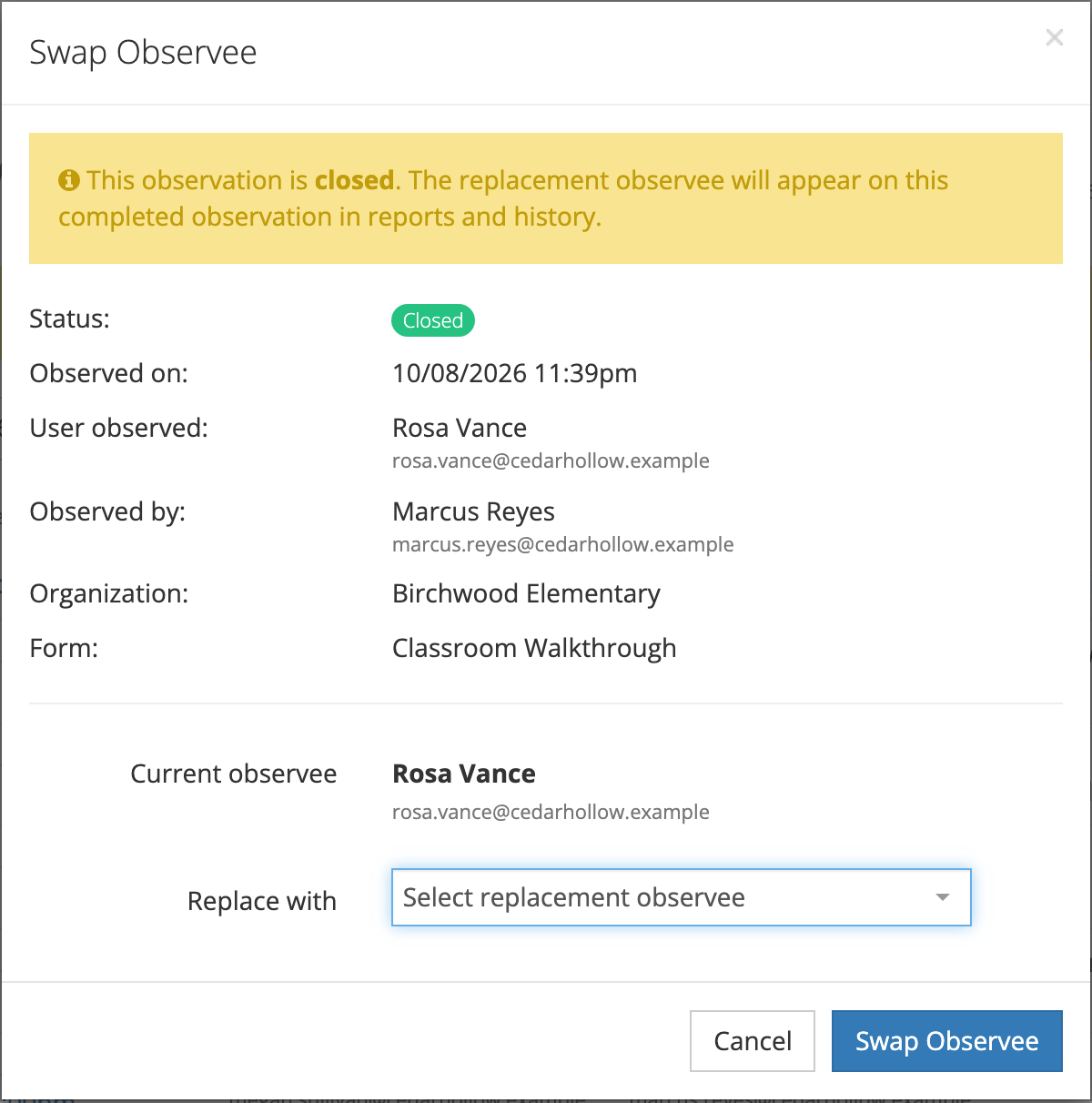
The replacement must already be set up in your district:
- Teacher: a user in your district with the observable role.
- Observer: an active user in your district with the observer role.
- School: any school or organization in your district.
If the right person is missing from your district or lacks the role, add them or give them the role before you contact support.
What changes after a swap
Section titled “What changes after a swap”A swap changes only the one field support picked. Everything else stays with the observation: the form, the scores and answers, the feedback, comments, attachments, and the observed date.
- Closed observations can be swapped. The new teacher, observer, or school appears on the completed observation in reports and history.
- A teacher’s signed acknowledgment keeps the name of the person who signed it. If the teacher is swapped after the original teacher acknowledged the observation, the record still shows that teacher as the signer.
- Observations tied to coaching are blocked. If active coaching action steps are anchored to the observation, support cannot swap the teacher or observer until those action steps are archived. Swapping the school is not blocked.