

Performance Reviews
Overview of Evaluation Periods
Learn what an evaluation period is, how evaluators use it on a performance review, and where system administrators manage the list.
An evaluation period is a named window of time, such as a school year, a semester, or a term, that an evaluator can attach to a performance review. Tagging each summative review with its period lets you tell this year’s evaluations apart from last year’s when you look back at a teacher’s record.
Role: system administrators manage evaluation periods. Evaluation periods appear only when performance reviews are turned on for your account.
What an evaluation period holds
Section titled “What an evaluation period holds”Each period has:
- Name: what evaluators see, for example “2026–27 School Year”.
- Term: an optional label for a part of the year. When you fill it in, the period shows as “Name - Term term” (for example “2026–27 School Year - Term 2”).
- Display Order: a number that sets the period’s place in the list when you have not sorted by a column.
- Start Date and End Date: the dates the period covers. They are shown in the list for your reference. They do not limit which reviews can use the period.
- Active?: whether evaluators can choose the period.
How evaluators use it
Section titled “How evaluators use it”When an evaluator starts a performance review, the Create Performance Review dialog shows an Evaluation Period list with every active period. The list starts on Select an Evaluation Period, so the evaluator picks a period each time, and the choice is optional. The evaluator can change it later on the review’s Information panel.
If no period is active, the Evaluation Period field does not appear at all. The chosen period then shows under Evaluation Period in the review’s details.
More than one period can be active at once. Every active period appears in the list, so deactivate a period when its cycle ends. That keeps evaluators from filing a new review under last year’s period.
Where to manage evaluation periods
Section titled “Where to manage evaluation periods”Go to System Administration > Subdivisions > Evaluation Periods. The Manage Evaluation Periods page lists your periods with their Id, Name, Start Date, End Date, and Status.
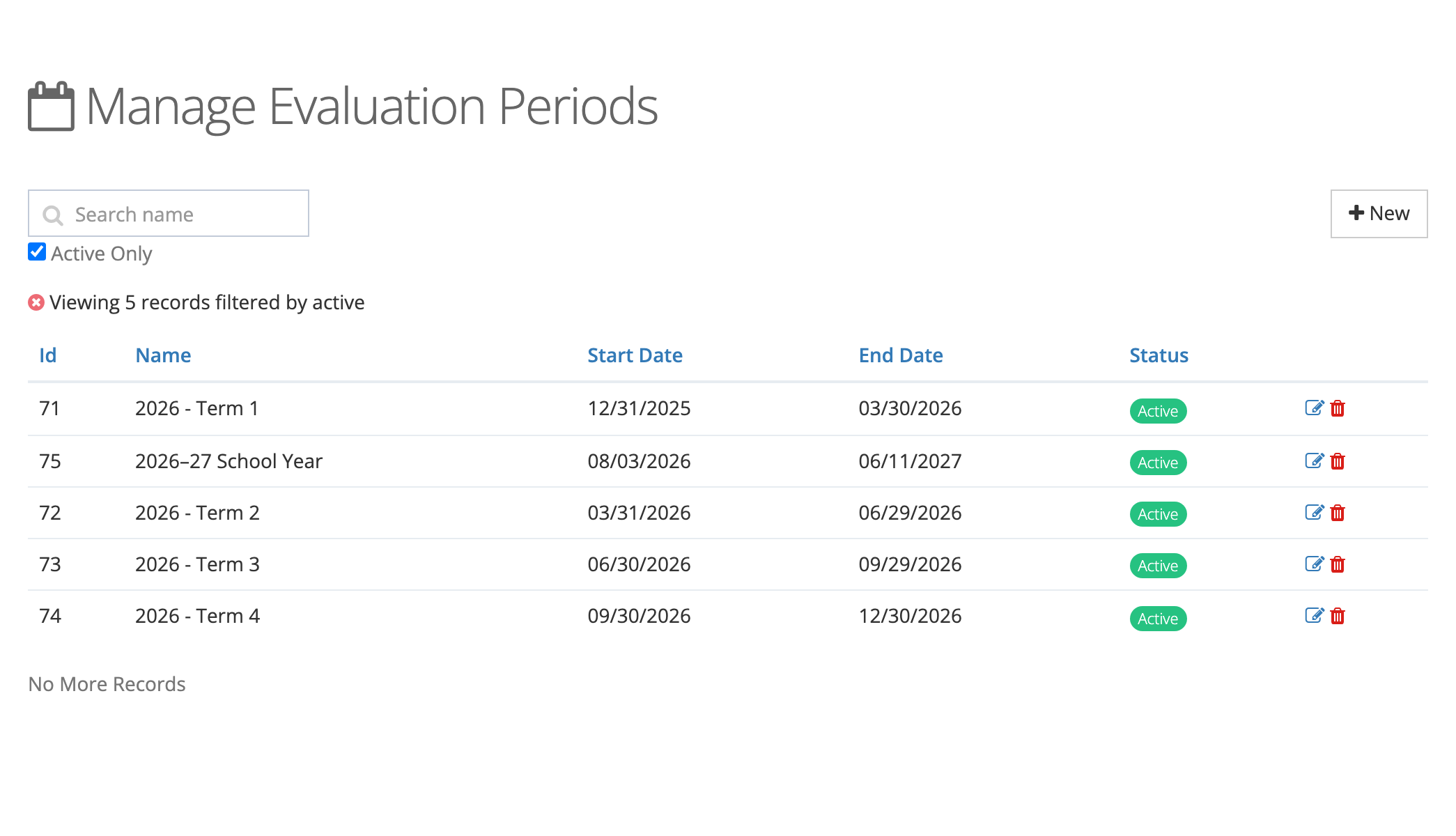
- Search name finds periods by name.
- Active Only is ticked when the page opens. Untick it to see inactive periods too.
- Click a column heading to sort by it.
- New opens the form for a new period. See Creating Evaluation Periods.
- The edit and delete icons on each row are covered in Managing Evaluation Periods.
Planning periods for your district
Section titled “Planning periods for your district”- Match your evaluation calendar. If your district writes one summative evaluation per teacher per year, one period per school year is enough. If principals complete a mid-year and an end-of-year review, use the Term field (for example, Term 1 and Term 2 under the same school year name).
- Name periods by their dates. “2026–27 School Year” stays clear in a teacher’s history years later. “Current Year” does not.
- Set up next year’s period before the first review is due, and deactivate the old one at the same time.
- Keep old periods. Deactivating a period keeps every review filed under it. A period that has reviews or observations tagged to it cannot be deleted.