

Release Notes
Release Notes: Directory Sync with Microsoft Entra ID
Published
Overview
Section titled “Overview”Districts that keep their staff in Microsoft Entra ID can now connect it to Master Teacher. Entra creates accounts for new staff, archives people who leave, keeps names and emails current, and decides roles and buildings through group membership. Nobody has to keep two staff lists in step by hand.
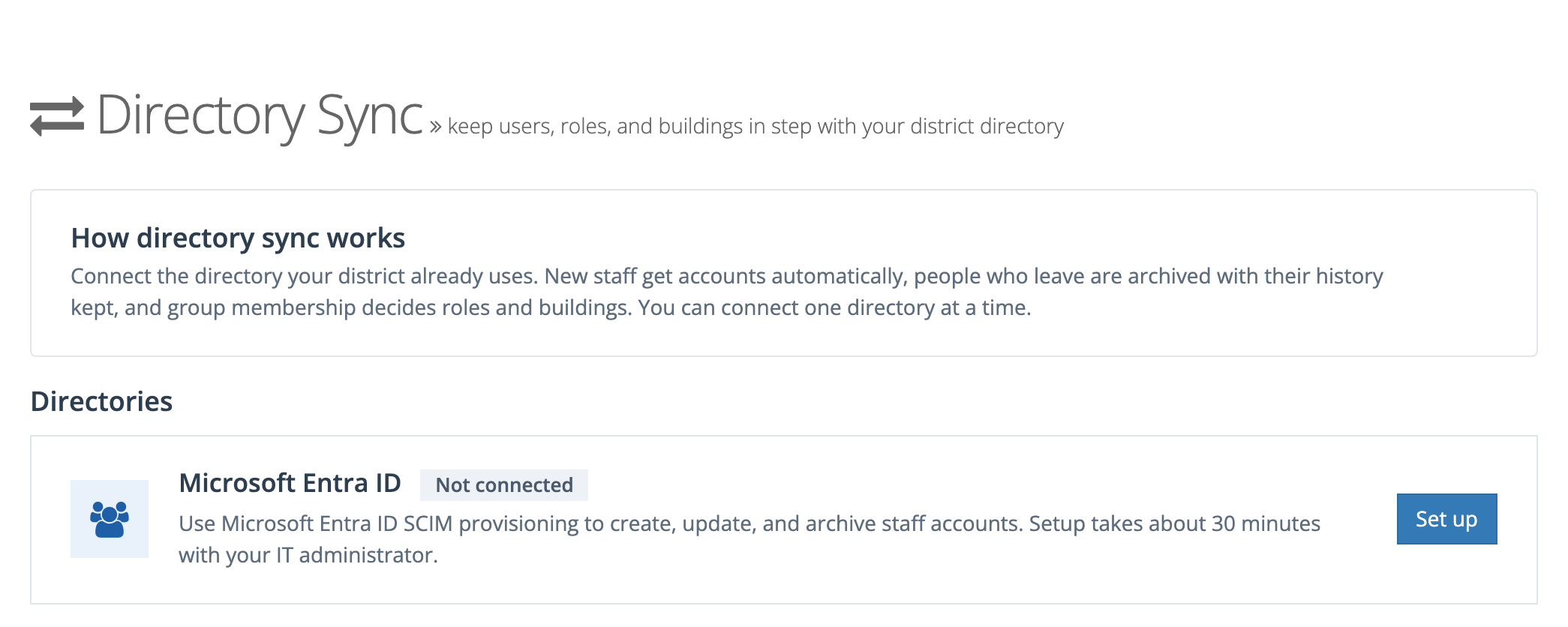
Directory Sync is turned on per district by your account representative. Once it is on, system administrators set it up from Directory Sync in the side menu. The full walkthrough is in Directory Sync with Microsoft Entra ID.
At a glance
Section titled “At a glance”- New Directory Sync page for district system administrators, listing the directories you can connect. Microsoft Entra ID is the first.
- A Tenant URL and one-time secret token connect Entra’s SCIM provisioning.
- Group mappings turn Entra groups into roles and buildings, with a preview of who gains and loses access before anything changes.
- Buildings from a user attribute (Department, Office location, or a custom attribute) for people in no building group.
- Needs attention collects anything that needs a decision: approvals, matches with archived accounts, held changes, and people missing a role or building.
- Recent activity records every change Entra made, kept for 90 days.
- Directory users show a Managed by your district’s IT department notice, and the fields the directory controls are locked in Manage Users.
What changed
Section titled “What changed”Accounts follow the directory
Section titled “Accounts follow the directory”When Entra sends a new person, Master Teacher creates their account, ready for single sign-on. No invitation email is sent. When Entra removes someone or marks them disabled, their account is archived and their observations, transcripts, and history are kept. If Entra sends them again later, the same account is restored.
Staff who already have an account are matched by email address, so they keep their history. If the match is an account an administrator archived, Master Teacher asks before linking it.
Groups decide roles and buildings
Section titled “Groups decide roles and buildings”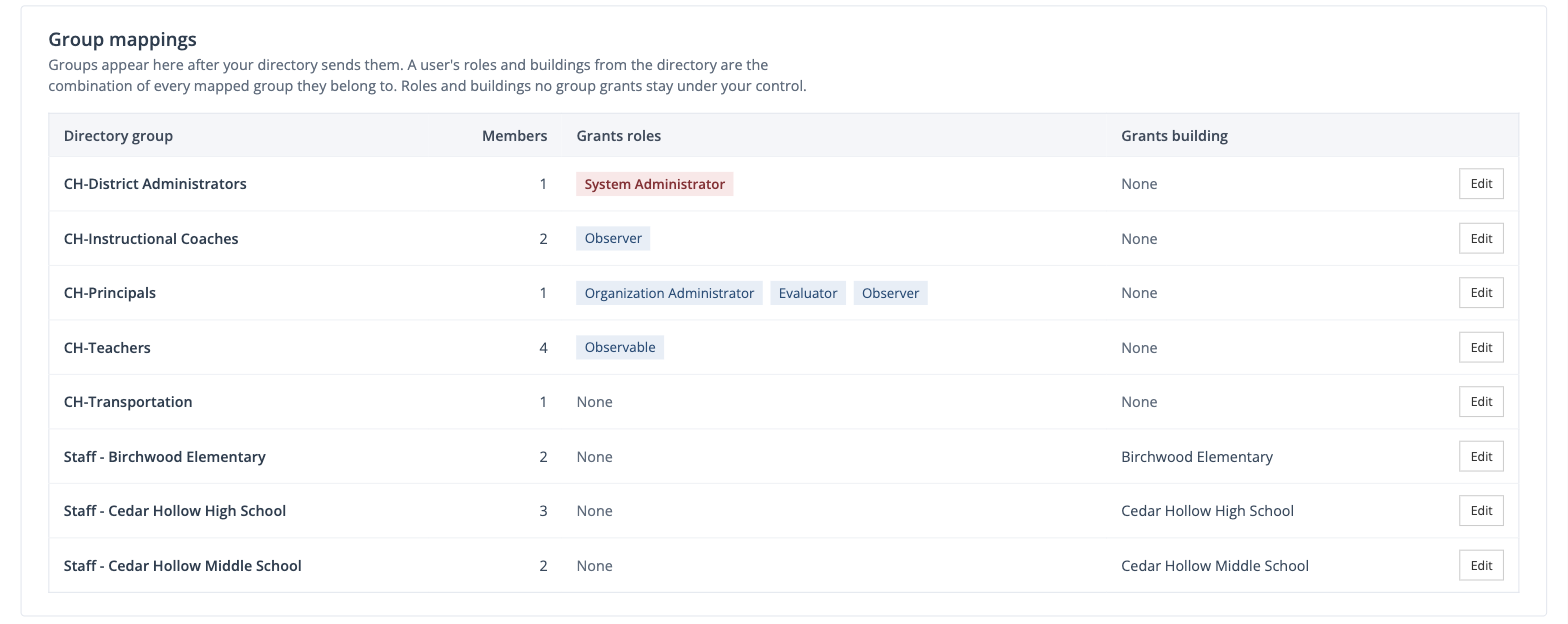
An administrator maps each Entra group to the roles and building it grants. A person’s access is the combination of every mapped group they belong to.
The directory controls only the roles and buildings that some mapped group grants. Roles and buildings no group grants stay under the administrator’s control and are never removed by the directory.
Safeguards
Section titled “Safeguards”- Preview before apply. A mapping change shows how many people gain and lose access before it can be applied.
- System Administrator needs approval. Each person a group would make a system administrator waits for an administrator to approve them.
- A system administrator’s email changes only with approval. Password resets go to that address.
- The last system administrator is kept. The directory can’t remove the district’s last one.
- Large removals are held. If one change would remove access from many people at once, the removals wait under Needs attention.
- Observable limits are respected. Once the limit is reached, new people don’t get the Observable role, and existing observables keep theirs.
Directory users in Manage Users
Section titled “Directory users in Manage Users”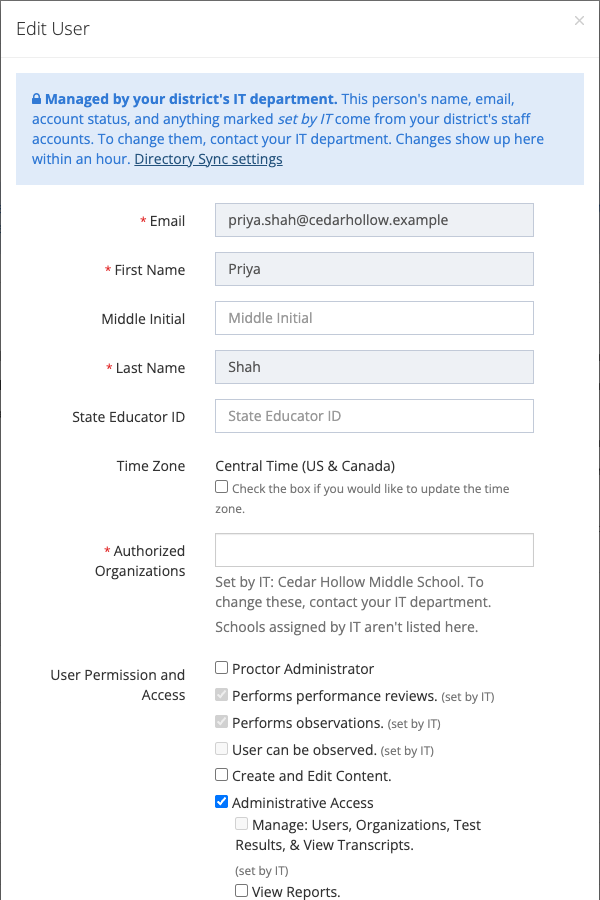
Name, email, status, and the roles and buildings a group grants are locked and marked (set by IT). Archive and suspend are handled by the directory. Bulk archive and bulk organization changes skip directory users.
Heads-up for support
Section titled “Heads-up for support”- “I don’t see Directory Sync.” It has to be enabled for the district by their account representative, and only system administrators whose account belongs to the district see it.
- “Someone didn’t get an account.” Check that they are in a group assigned to the app in Entra. If their email already belongs to an account in another district, they appear under Needs attention as Not created.
- “A teacher lost a role.” Check which group granted it. The directory removes a role only when a mapped group grants it and the person is no longer in any group that does.
- “The status says Token rejected.” Entra is using a revoked or mistyped token. Generate a new token and paste it into Entra.
- “Changes take a while.” Entra sends changes about every 40 minutes. Provision on demand in Entra sends one person right away.