

Reseller Notes
Reseller Notes: Closing an Observation the Teacher Has Not Answered
What changed, who it affects, what needs no action, and what to say when a district asks.
Published
An administrator sometimes has to close an observation a teacher never responded to. The teacher is on extended leave, has left the district, or the evaluation cycle has to be reported on and the window has passed.
weCLIMB could already do this. What it could not do was offer it anywhere on screen, or describe the result accurately afterwards. Both are fixed. Six things changed, and the section near the end lists what deliberately did not.
There is nothing to enable and no district action required.
Who this affects
Section titled “Who this affects”Only districts that have Acknowledgment turned on for at least one Form Set. To check a district, open Form Sets, edit any set, and look at the Acknowledgment switch.
Districts that do not use Acknowledgment see one change only: the wording under the Reflection and Acknowledgment switches is corrected. Their observations behave exactly as before.
Screens below are from a fictional district built for this document. Every name, school, and email address in them is invented.
1. Administrators can close from the screen
Section titled “1. Administrators can close from the screen”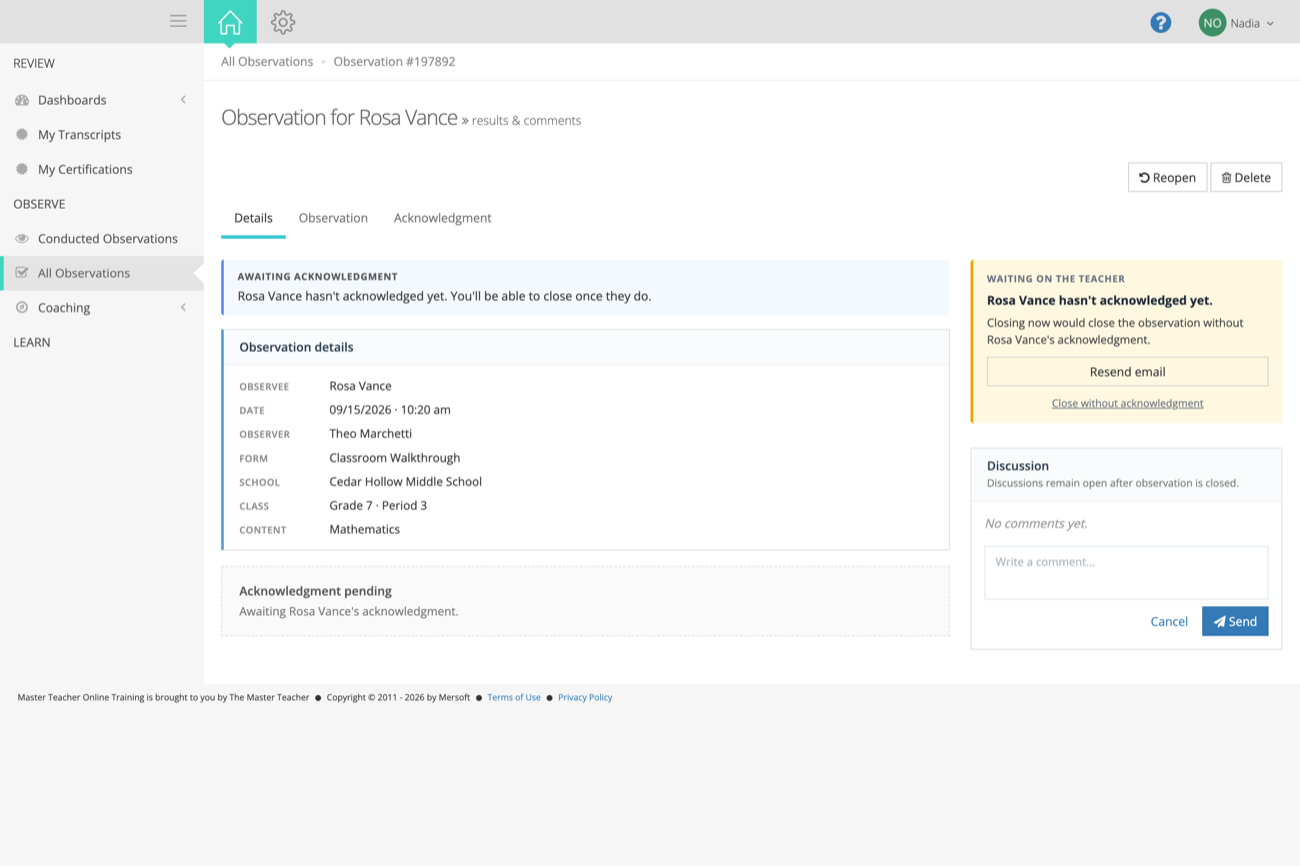
What you’ll see: a small Close without acknowledgment link underneath the message about waiting on the teacher. It is a quiet link rather than a button on purpose. Waiting is still the normal thing to do, and this is the exception.
Who sees it: administrators only. An observer looking at the same observation gets the waiting message with no link, exactly as before.
What was happening before: administrators already had permission to do this, and the confirmation screen was built, but nothing anywhere in the product linked to it. The screen told an administrator “You’ll be able to close once the teacher acknowledges,” with no way forward. The only way to reach it was to know the web address by heart.
2. A written reason is required
Section titled “2. A written reason is required”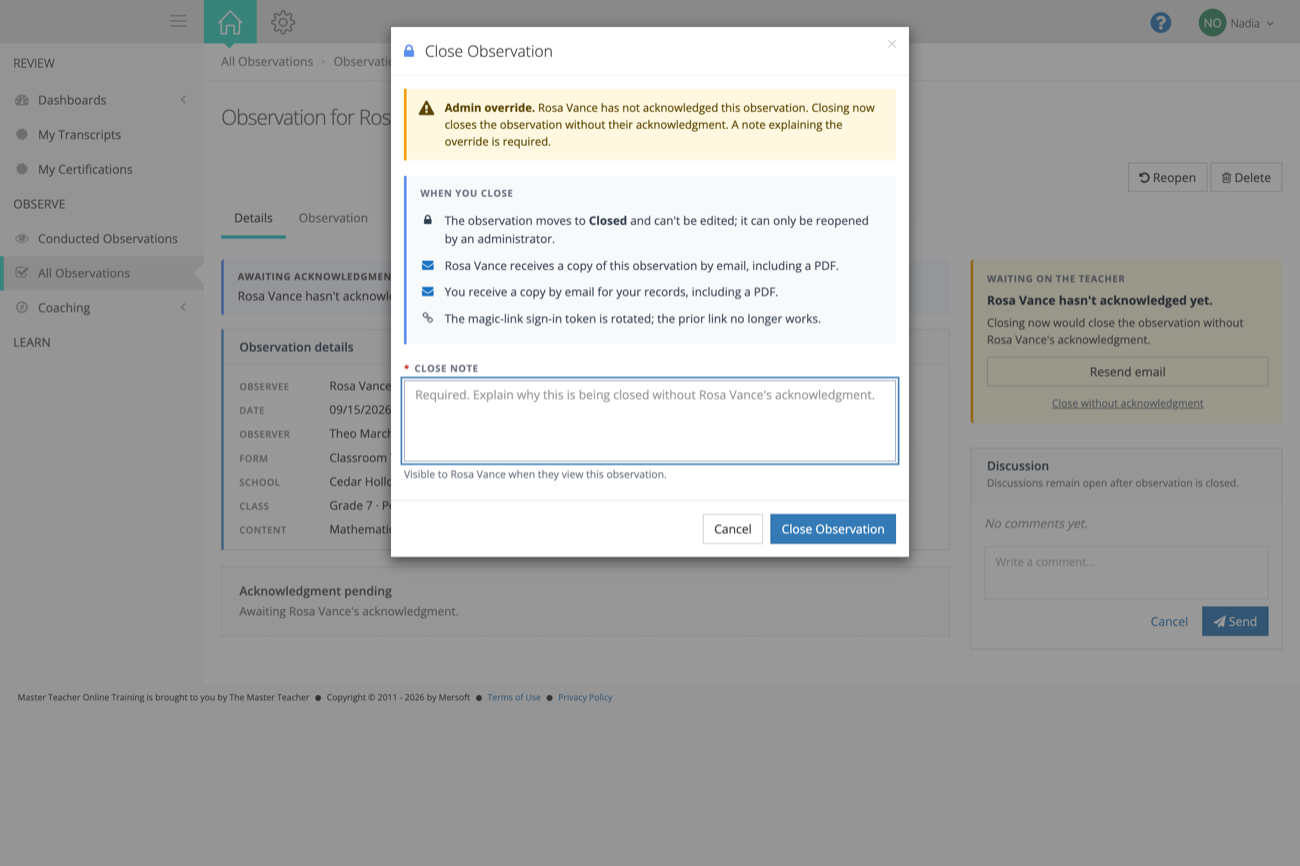
The confirmation lists what happens when they close, and the reason field is required. An administrator cannot close without typing one. That reason is shown to the teacher on the observation, so they are never left guessing why it was closed without them.
3. The teacher’s copy no longer contradicts itself
Section titled “3. The teacher’s copy no longer contradicts itself”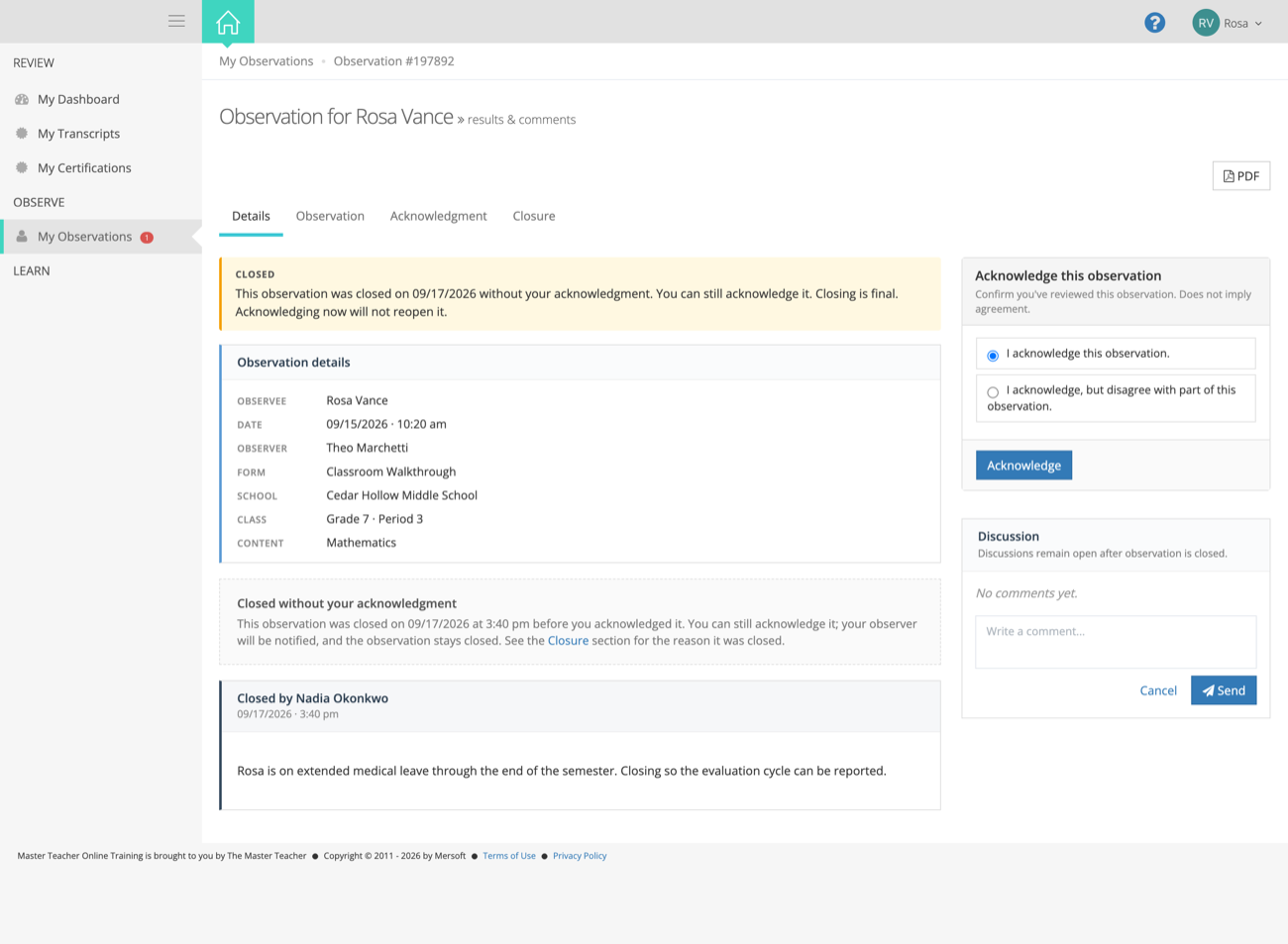
What the teacher used to see: a green banner reading “This observation is closed. No further action is required” directly above a fully working Acknowledge button. Teachers who used that button ended up with a record whose own closing note said they had never acknowledged it. Two statements on one page, contradicting each other, on a document that goes in a personnel file.
The banner now reads “Closing is final. Acknowledging now will not reopen it.” so a teacher knows both that the window is still open to them and that using it changes nothing about the observation’s status. It is amber rather than green, because a green “all done” bar sitting over a request to act was the same contradiction in colour.
Careful with this one. Teachers being able to respond after closing is not new and is not something this release turned on. It has always worked that way. What changed is that the page now says so instead of denying it. Please don’t announce it as a new capability.
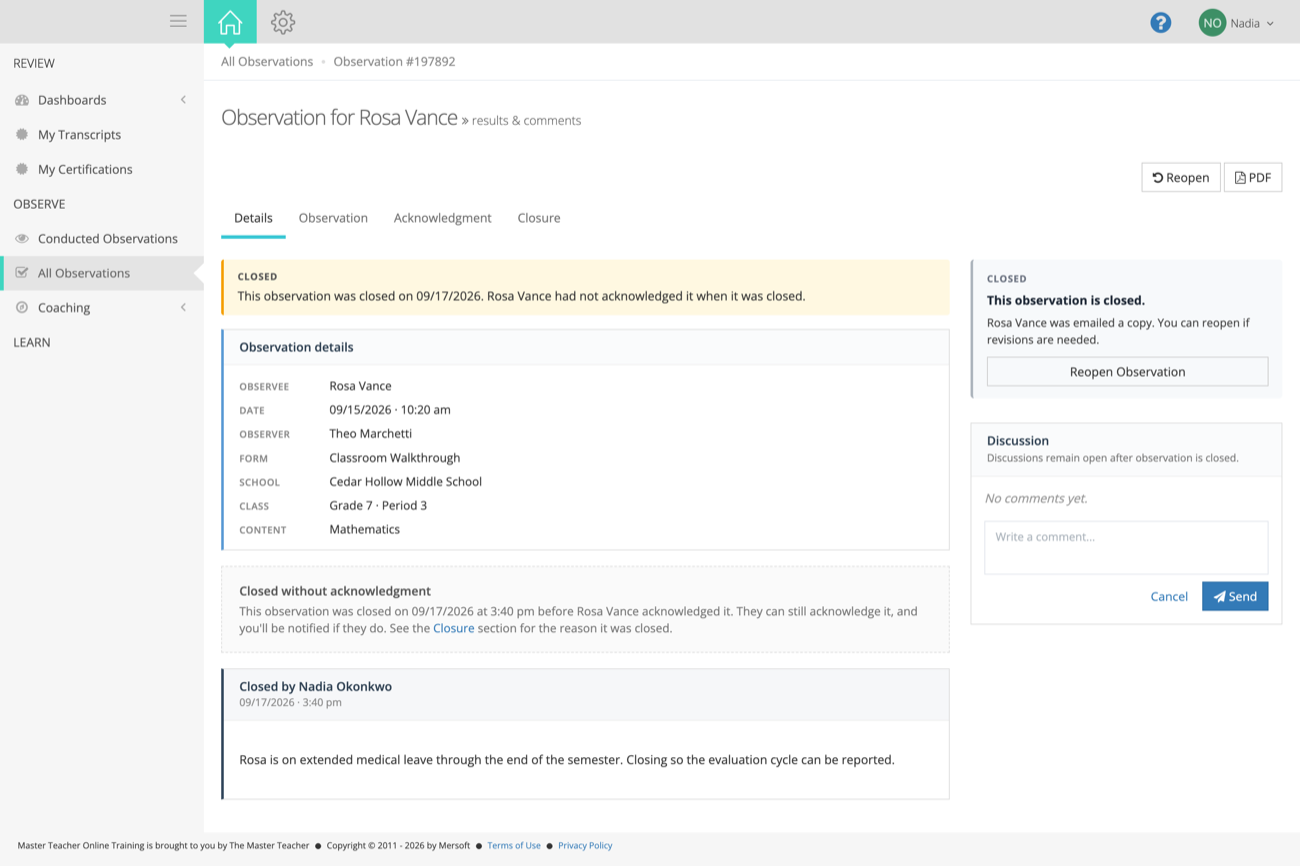
The administrator’s copy changed to match. The panel on the right now offers Reopen instead of the “Waiting on the teacher, you’ll be able to close once they acknowledge” prompt it used to show on an observation that was already closed.
4. A late acknowledgment is dated against the closing
Section titled “4. A late acknowledgment is dated against the closing”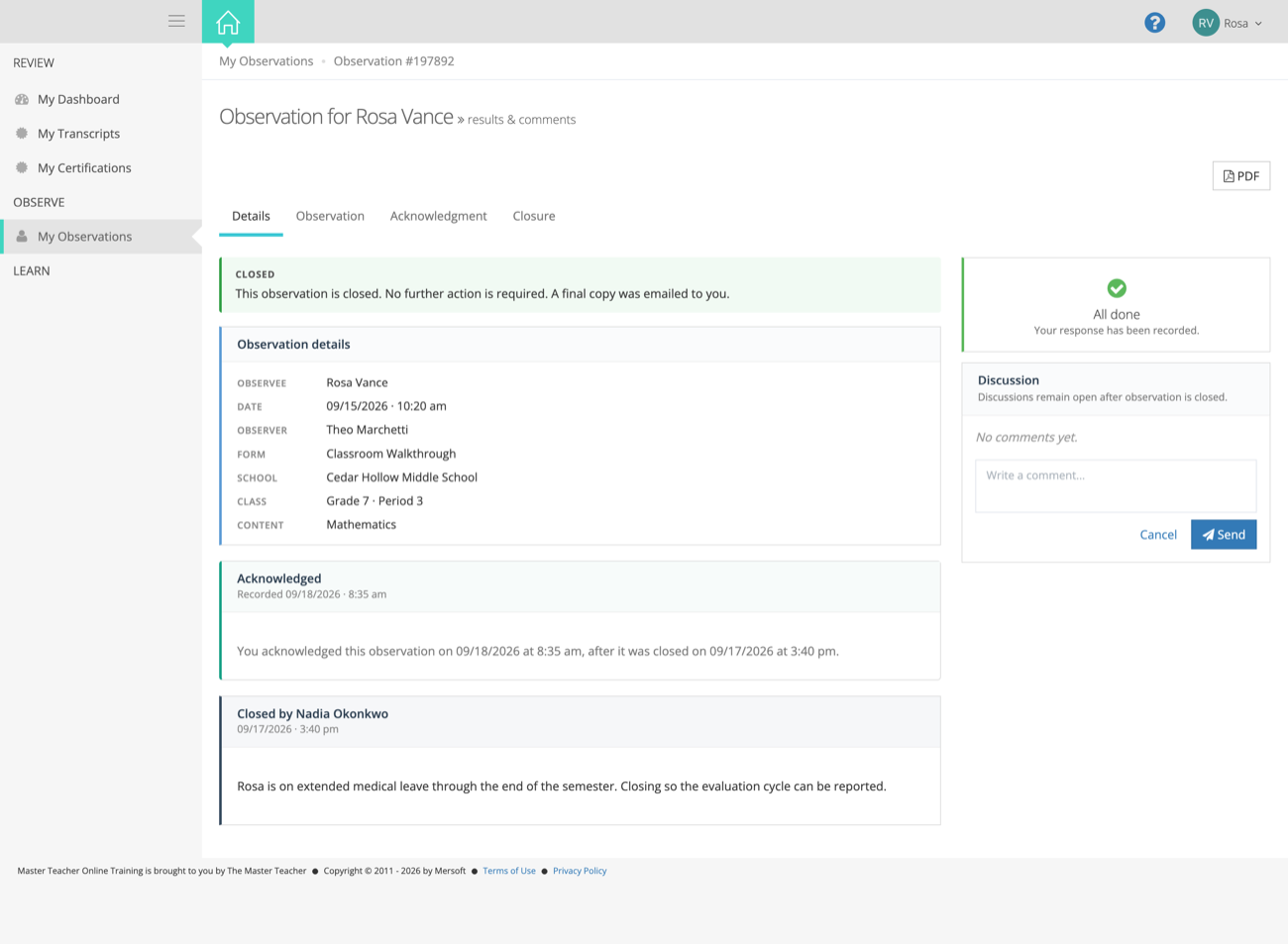
If the teacher does acknowledge after the observation was closed, the record now says so in plain terms: acknowledged on this date, after it was closed on that date. Anyone reading the observation later, including in a dispute, sees the sequence rather than two entries that appear to disagree.
5. The observer’s email stopped asking for the impossible
Section titled “5. The observer’s email stopped asking for the impossible”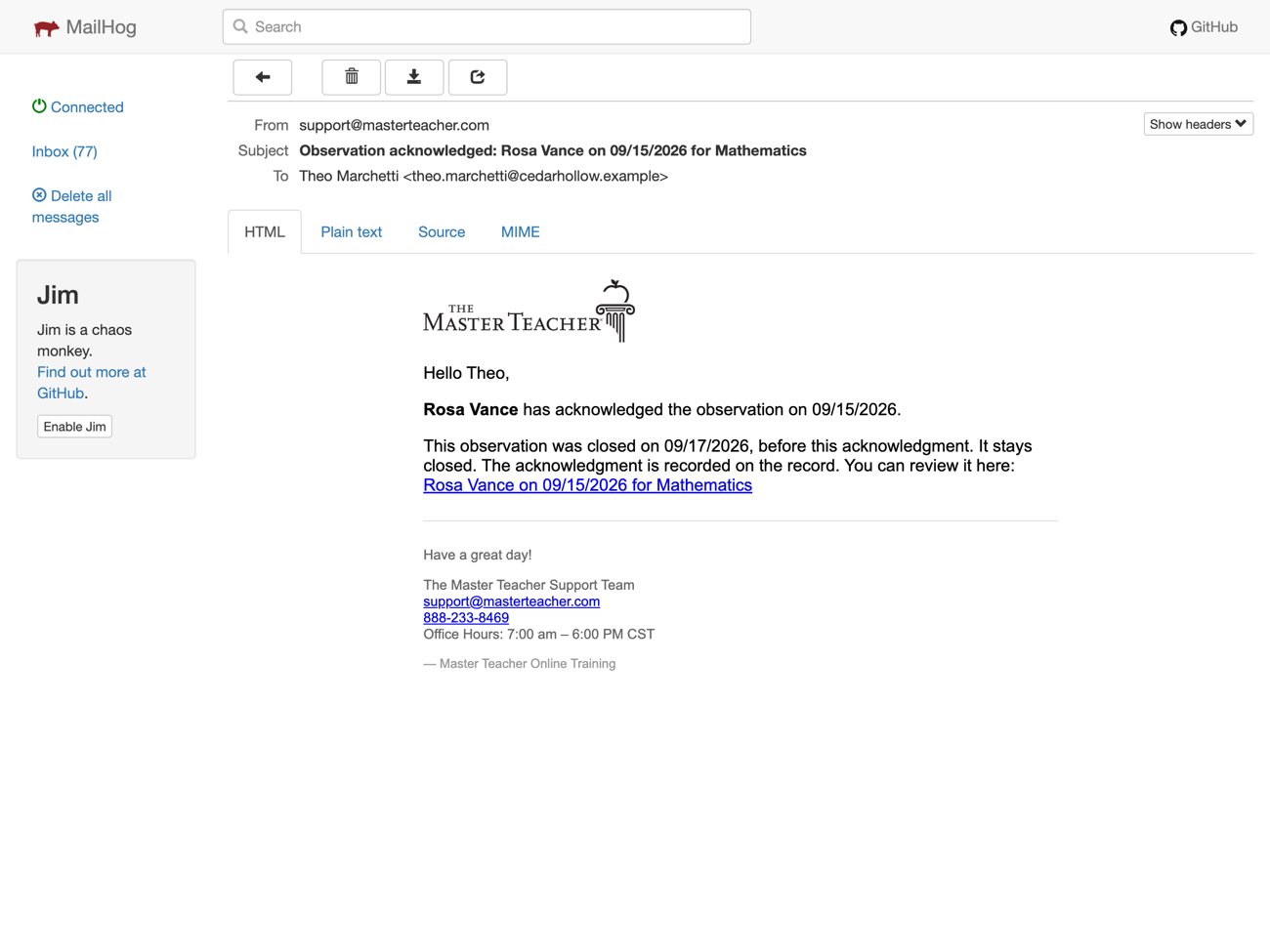
What it used to say: “You can review the acknowledgment and finalize the observation here,” sent about an observation that was already closed, where there was nothing left to finalize. Observers would follow the link looking for a button that wasn’t there.
The email now says the observation was already closed before the acknowledgment arrived, that it stays closed, and that the acknowledgment is on the record.
6. The Form Set settings describe what they actually do
Section titled “6. The Form Set settings describe what they actually do”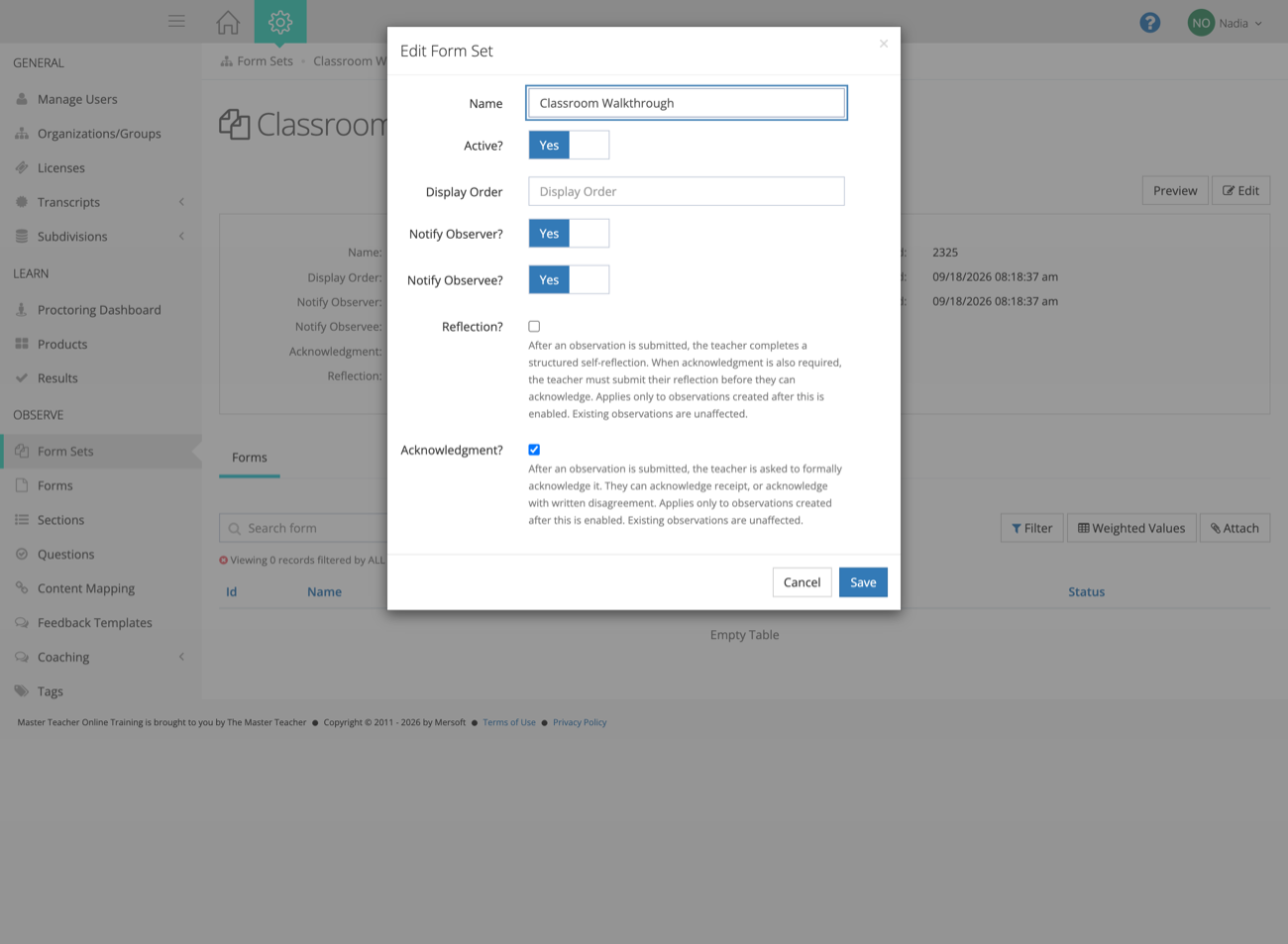
The help text under the Reflection and Acknowledgment switches both said the teacher is asked to respond “after an observation is closed.” That has never been how it works. The teacher is asked when the observation is submitted, and the observer closes it afterwards. Anyone who set these up based on that description had the sequence backwards.
Both also said the setting applies to observations submitted or closed after you turn it on. It actually applies to observations created after you turn it on. This matters in practice: an observation started last week and submitted today will not pick up a setting enabled yesterday.
Worth knowing for tickets: if a district turns Acknowledgment on and reports that “it isn’t working,” check when the observations were created, not when they were submitted. Drafts started before the switch was flipped will never ask for acknowledgment.
What did not change
Section titled “What did not change”- The “Acknowledge but disagree” option is untouched. Same wording, same behaviour, still available wherever it was before. Work on making that configurable is separate and not in this release.
- Teachers responding after a closing is existing behaviour. This release describes it; it did not create it.
- Observations already closed are unaffected. Nothing was changed retroactively and no records were rewritten.
- Nothing to enable. No new setting, no configuration step, no district action.
- Who can close is unchanged. The same administrators who always had this permission still have it, and observers still do not.
If a district asks
Section titled “If a district asks”| They say | You can say |
|---|---|
| ”We have teachers who never acknowledge and we can’t close anything out.” | An administrator can now close it from the observation itself. They’ll be asked to type a reason, and the teacher will see that reason. |
| ”Why can a teacher still acknowledge after we closed it?” | That has always been possible. The page used to say the opposite. Their acknowledgment is recorded and dated, and it does not reopen the observation. |
| ”Our teachers were confused by the closed observation screen.” | That is the main thing this release fixes. The screen used to say no further action was required while still offering the button. It now explains what happened and what’s still open to them. |
| ”We turned Acknowledgment on and nothing happened.” | The setting applies to observations created after it’s enabled. Anything already started keeps the settings it began with. |
| ”Did you change the disagree option?” | No. It works exactly as it did. |